![Bebop_B_Dark-1 (1).png]](https://help.bebop.ai/hs-fs/hubfs/Bebop_B_Dark-1%20(1).png?height=40&name=Bebop_B_Dark-1%20(1).png)
One Unified Interface — No More Choosing Modes
In Bebop 1.0, you had to decide which mode to use — Prospecting, Buyer Intent, Technographics, LinkedIn Contacts, and so on. That's gone.
Bebop 2.0 combines everything into one intelligent interface. Just describe who you're looking for and Bebop figures out the best approach automatically. No more guessing which mode to start with.
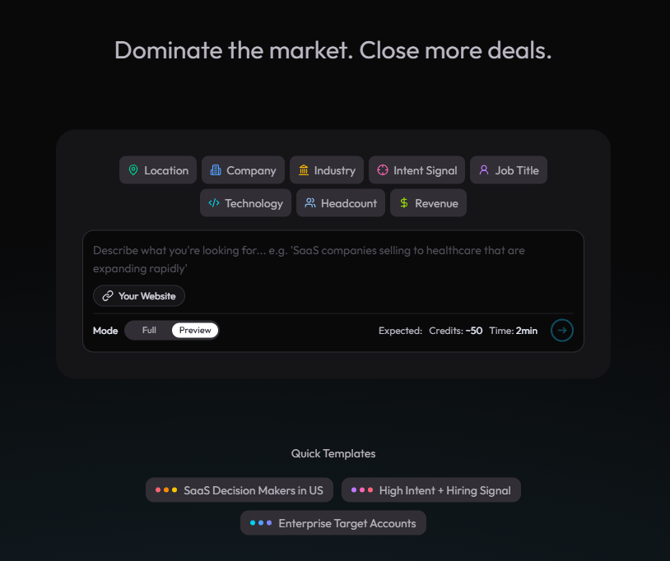
The new unified Bebop 2.0 home/search interface — single search input with no mode selector visible.
The Audience Builder
Bebop 2.0 introduces a structured Audience Builder alongside free-text search. You can now filter your search using editable filter chips:
- Location
- Company
- Industry
- Intent Signal
- Job Title
- Technology
- Headcount
- Revenue
Autocomplete works across companies, industries, and locations — so you spend less time typing and more time prospecting. You can still free-text if you prefer, and Bebop will apply filters automatically based on what you describe.

The Audience Builder with filter chips visible — with a few filters already applied.
Preview Mode and Full Mode
You no longer have to commit to a full search and wait 15 minutes to find out the results aren't quite right.
Bebop 2.0 introduces two run modes:
- Preview Mode — returns 2-3 results in approximately 2-4 minutes so you can sense-check your direction before committing
- Full Mode — returns 80-200+ results and runs for 5-15 minutes once you're confident in your targeting
Start with Preview, refine if needed, then run Full Mode when you're happy with the direction.

The run mode selector showing Preview Mode and Full Mode options — before hitting run.
See Exactly What Bebop is Doing — Live
In Bebop 1.0, once you hit run, you were staring at a loading screen with no idea what was happening. That's changed.
Bebop 2.0 streams its reasoning in real time. As your search runs, you can watch the AI's agent steps — web searches, code execution, reasoning, and cost updates — as they happen. No more guessing how long it'll take or what it's working on.
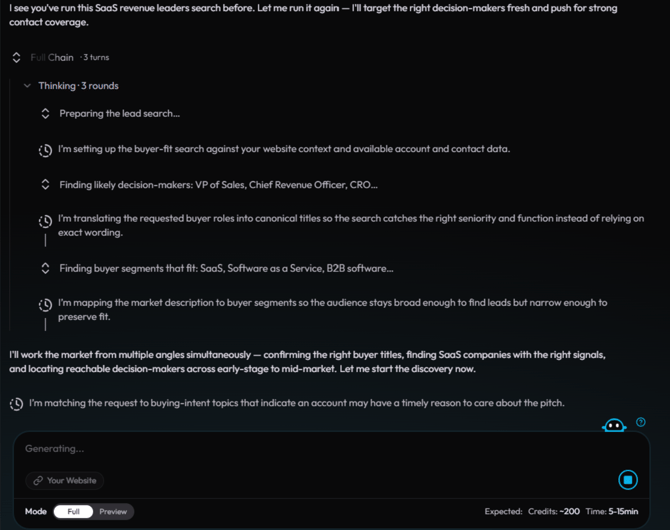
The live agent progress stream mid-search — showing agent steps, reasoning text, and cost/time update.
Re-joinable Sessions
Navigated away from a running search by accident? In Bebop 1.0, that context was gone.
In Bebop 2.0, sessions are fully re-joinable. You can refresh the page, close the tab, or come back later — your search will still be running and your results will be right where you left them.
The Assets Library
Everything Bebop generates is now saved automatically — forever.
In Bebop 1.0, emails, playbooks, and lists only existed inside the original chat. Close the chat and they were gone. Bebop 2.0 introduces a dedicated Assets library where all your generated content lives:
- Outreach emails
- Sales playbooks
- Prospect lists
- Word documents, PDFs, and more
Everything is organised, searchable, and accessible anytime — not just in the session it was created.
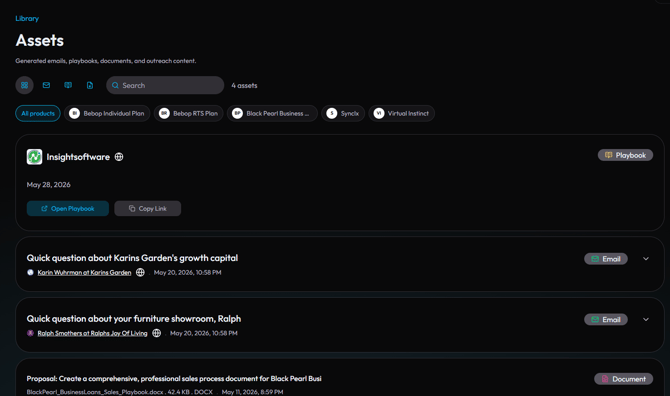
The Assets library screen showing a list of saved items — emails, playbooks, and documents visible.
Redesigned Playbooks
Playbooks have been completely rebuilt in Bebop 2.0. They're more detailed, more structured, and generated directly from your lead results.
Each Playbook now includes:
- Contact Intelligence — key people and how to reach them
- Intent Analysis — what signals triggered this account
- Risks & Objections — likely pushback and how to handle it
- Conversation Strategy — how to open and steer the conversation
- Outreach Suggestions — ready-to-use messaging angles
You can also batch generate Playbooks for multiple accounts at the same time — no more doing them one by one.
Generate Documents — Word, PDF, and More
Bebop 2.0 can now generate full documents — not just text in a chat window.
From any lead or research session, you can export your work as a Word document, PDF, or presentation. All generated files are saved automatically to your Assets library.
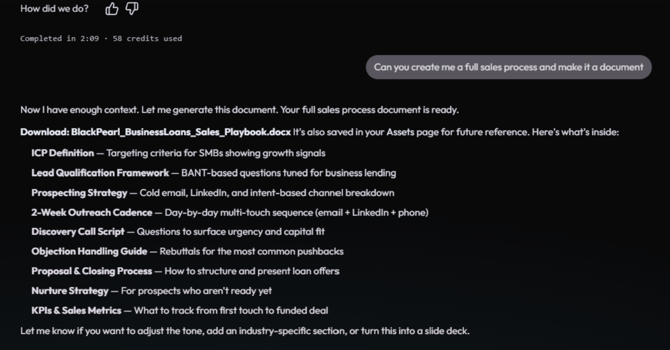
The document generation option from a lead or playbook — showing the export/generate document button and file type options.
Lead Actions and Batch Actions
You can now take action directly from any lead row — without going back and forth between screens.
From a lead, you can:
- Generate a cold email
- Create a full Sales Playbook
- Expand to Full Mode from a Preview result
Need to act on multiple leads at once? Select them and run batch actions across all of them simultaneously.
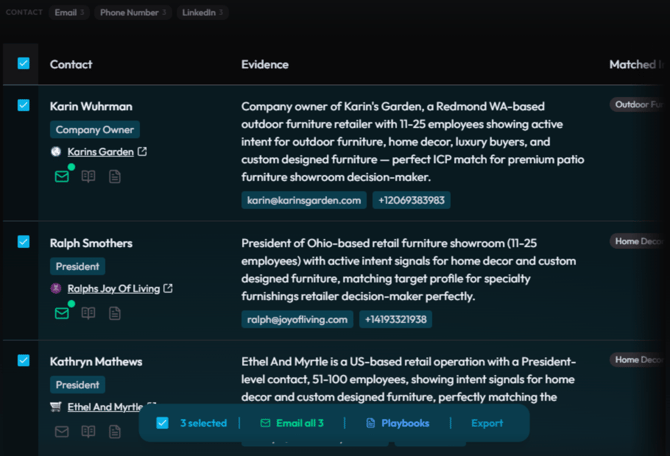
A lead row with the action options visible — email, playbook, and full mode buttons showing.
My Bebop is Now Products & Documents
If you used My Bebop in Bebop 1.0 to upload your Sales Kits and teach Bebop about what you sell — that feature is still here, just renamed and reorganised.
It's now called Products & Documents. Same purpose — define what you're selling so your Playbooks and outreach emails are accurate and contextual — just cleaner navigation and a better layout.
Bebop Learns Over Time
Bebop 2.0 gets smarter the more you use it.
Every email you generate, every Playbook you create, and every interaction you have trains Bebop on your preferences, your tone, and your ideal targets. Over time, outputs become more refined and more accurate to your specific business — without you having to re-explain yourself every session.
New Credit and Token System
Bebop 2.0 introduces a transparent credit and token system so you always know what a search costs before you run it.
Estimated cost and time are shown upfront for every search. Per-search safety caps prevent unexpected usage. Plans are available at three tiers — Starter, Pro, and Elite — each with a set token allocation per month.
What Stayed the Same
Bebop 2.0 is a new experience, but the core purpose hasn't changed. You're still using Bebop to:
- Find the right companies and decision makers
- Understand why they're a fit right now
- Build outreach that actually resonates
Everything new in 2.0 is designed to help you do those three things faster and with less friction.
Need help getting started? Visit the Bebop Help Centre or book a support session with the team.